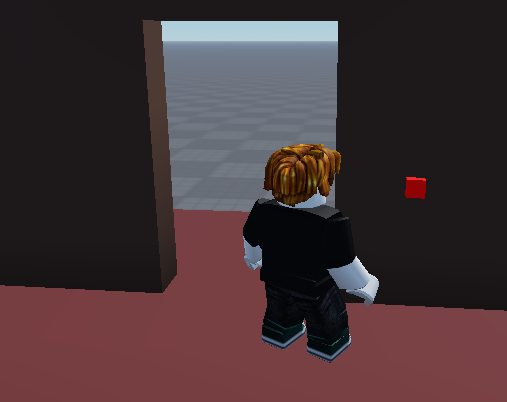
Plusieurs exemples de scripts LUA pour changer la couleur d’un part, mourir à petit feu, devenir tout petit, glisser, voler, se téléporter, grandir, sauter plus, courir plus, crée un menu, crée une arme fatale.
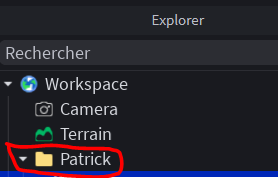
Crée un Folder à ton nom pour mettre toutes tes créations :
Changer la couleur d’un part
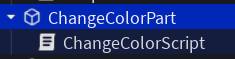
local part = script.Parent

part.Touched:Connect(function(hit)
	part.BrickColor = BrickColor.random()
	part.Material = Enum.Material.Neon
end)
Un part mortel :
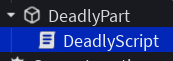
local part = script.Parent
part.Touched:Connect(function(hit)
	-- Récupération du joueur
	local character = hit.Parent
	local humanoid  = character and character:FindFirstChildOfClass("Humanoid")
	if not humanoid or humanoid.Health <= 0 then return end
	humanoid:TakeDamage(10)
end)
Rendre tout petit le joueur :
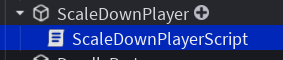
local part = script.Parent

part.Touched:Connect(function(hit)
	-- Récupération du joueur
	local character = hit.Parent
	local humanoid  = character and character:FindFirstChildOfClass("Humanoid")
	if not humanoid or humanoid.Health <= 0 then return end

	humanoid.BodyHeightScale.Value = 0.4
	humanoid.BodyWidthScale.Value = 0.4
	humanoid.BodyDepthScale.Value = 0.4
	humanoid.HeadScale.Value = 0.4

end)
Faire glisser un part avec un clickDetector :
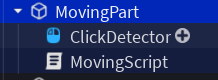
local part = script.Parent

local clickDetector = part.ClickDetector

clickDetector.MouseClick:Connect(function(player)
	part.Anchored = false
	part.AssemblyLinearVelocity = Vector3.new(0, 0, 50)
end)
Part pour voler avec un clickDetector :
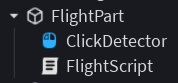
local AntiGravity = require(game.ReplicatedStorage.AntiGravity)
local part = script.Parent

local clickDetector = part.ClickDetector
clickDetector.MouseClick:Connect(function(player)
	part.Anchored = false
	AntiGravity.Start(part)
	part.AssemblyLinearVelocity = Vector3.new(0, 10, 10)
end)
Téléportation d’un point A à un point B :
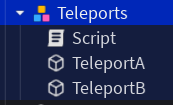
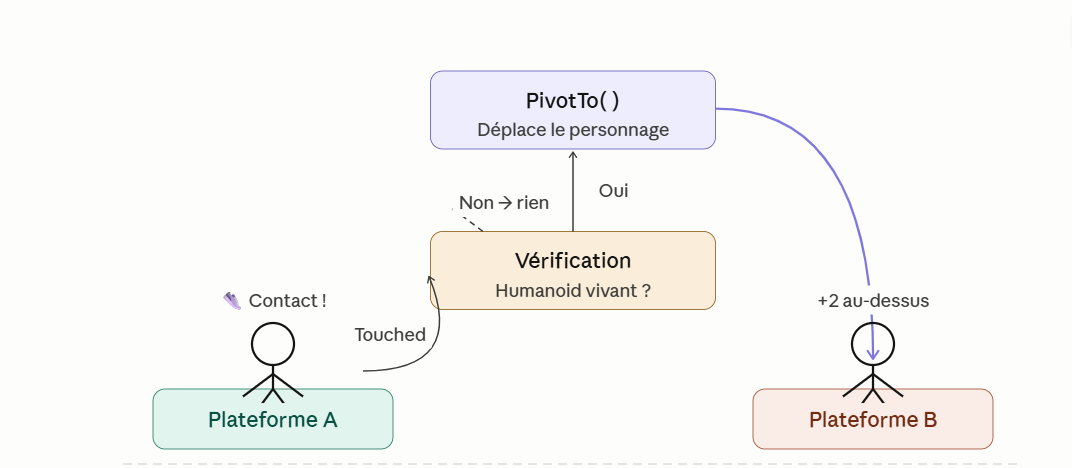
Voici l’explication du code, ligne par ligne :
Les variables de départ
local teleports = script.Parent
local teleportA = teleports.TeleportA
local teleportB = teleports.TeleportB
On récupère deux objets dans le jeu Roblox : la plateforme A (celle sur laquelle on va marcher) et la plateforme B (celle où on va arriver). Ces deux plateformes sont des enfants du script dans l’arbre du jeu.
L’événement Touched
teleportA.Touched:Connect(function(hit)Touched est un événement Roblox : il se déclenche automatiquement dès que quelque chose touche la plateforme A. Le paramètre hit contient la pièce (la partie du corps) qui l’a touchée.
La vérification du joueur
local character = hit.Parent
local humanoid = character and character:FindFirstChildOfClass("Humanoid")
if not humanoid or humanoid.Health <= 0 then return end
On remonte d’un niveau pour trouver le personnage entier (hit.Parent), puis on cherche s’il contient un Humanoid (ce qui prouve que c’est bien un joueur, pas un mur ou une balle). Si rien de valide n’est trouvé, ou si le joueur est mort (Health <= 0), on arrête tout avec return.
La téléportation
local offset = Vector3.new(0, 2, 0)
character:PivotTo(CFrame.new(teleportB.Position + offset))
Vector3.new(0, 2, 0) crée un décalage de 2 unités vers le haut pour que le joueur atterrisse au-dessus de la plateforme B et pas à l’intérieur. PivotTo est la fonction qui déplace instantanément tout le personnage à une nouvelle position — c’est ça la téléportation !
Le code complet de la téléportation
-- Configuration
local teleports = script.Parent
local teleportA = teleports.TeleportA
local teleportB = teleports.TeleportB

teleportA.Touched:Connect(function(hit)
	-- Récupération du joueur
	local character = hit.Parent
	local humanoid  = character and character:FindFirstChildOfClass("Humanoid")
	if not humanoid or humanoid.Health <= 0 then return end

	-- Décalage légert vers le haut pour poser le joueur sur la plateforme
	local offset = Vector3.new(0, 2, 0)
	character:PivotTo(CFrame.new(teleportB.Position + offset))

end)
Grandir, Sauter, Courir plus vite :
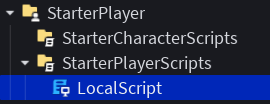
local UserInputService = game:GetService("UserInputService")

local Players = game:GetService("Players")
local player = Players.LocalPlayer
local humanoid = player.Character and player.Character:FindFirstChildOfClass("Humanoid")

local function onKeyPress(input, gameProcessed)
	if not humanoid then return end

	if input.KeyCode == Enum.KeyCode.F and not gameProcessed then
		humanoid.JumpHeight += 8
	end

	if input.KeyCode == Enum.KeyCode.G and not gameProcessed then
		humanoid.JumpHeight -= 8
	end

	print(input.KeyCode)
	if input.KeyCode == Enum.KeyCode.X and not gameProcessed then
		humanoid.WalkSpeed += 10
	end

	if input.KeyCode == Enum.KeyCode.Z and not gameProcessed then
		humanoid.WalkSpeed -= 10
	end

end

-- Connecter la fonction à l'événement InputBegan
UserInputService.InputBegan:Connect(onKeyPress)print("Hello world!")
Touches du clavier :
- F sauter plus haut
- G sauter moins haut
- X courir plus vite
- W courir moins vite
- A grandir
- E plus petit
Menu disponible pour le joueur :
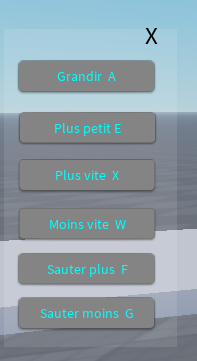
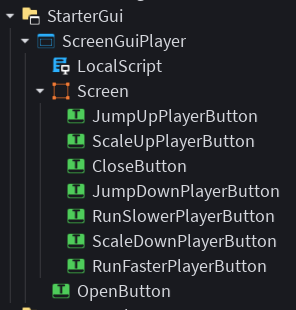
local screenGui = script.Parent
local open = screenGui.OpenButton
local screen = screenGui.Screen
local close = screen.CloseButton
local scaleUpPlayer = screen.ScaleUpPlayerButton
local scaleDownPlayer = screen.ScaleDownPlayerButton
local runSlowerPlayer = screen.RunSlowerPlayerButton
local runFasterPlayer = screen.RunFasterPlayerButton
local jumpUpPlayer = screen.JumpUpPlayerButton
local jumpDownPlayer = screen.JumpDownPlayerButton

local replicatedStorage = game:GetService("ReplicatedStorage")
local runScalePlayer = replicatedStorage:WaitForChild("RunScalePlayer")

local runScalePlayer = replicatedStorage:WaitForChild("RunScalePlayer")
local HumanoidFinder = require(replicatedStorage.HumanoidFinder)
local StarterPlayer = game:GetService("StarterPlayer")

local humanoid, character = HumanoidFinder.GetLocal()

screen.Visible = false

open.MouseButton1Click:Connect(function()
	screen.Visible = not screen.Visible
	open.Visible = not open.Visible
end)

close.MouseButton1Click:Connect(function()
	screen.Visible = not screen.Visible
	open.Visible = not open.Visible
end)

scaleUpPlayer.MouseButton1Click:Connect(function()
	runScalePlayer:FireServer(0.5)
end)

scaleDownPlayer.MouseButton1Click:Connect(function()
	runScalePlayer:FireServer(-0.5)
end)

runSlowerPlayer.MouseButton1Click:Connect(function()
	humanoid.WalkSpeed -= 10
end)

runFasterPlayer.MouseButton1Click:Connect(function()
	humanoid.WalkSpeed += 10
end)

jumpUpPlayer.MouseButton1Click:Connect(function()
	humanoid.JumpHeight += 8
end)

jumpDownPlayer.MouseButton1Click:Connect(function()
	humanoid.JumpHeight -= 8
end)
Créer une arme fatale :
Créer un objet Tool puis un part renommer Handle :
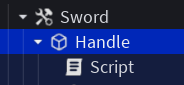
Pour réduire à l’impuissance vos adversaires :
local part = script.Parent

part.Touched:Connect(function(hit)
	if not hit then return end
	-- Récupération du joueur
	local character = hit.Parent
	local humanoid  = character and character:FindFirstChildOfClass("Humanoid")
	if not humanoid or humanoid.Health <= 0 then return end

	humanoid:TakeDamage(10)

end)