Commentaire d’une ligne :
--print("instruction en commentaire")Commentaire de plusieurs instructions :
--[[
print("instruction en commentaire")
print("instruction en commentaire")
--]]
Recherche d’une ressource dans un script :
-- recherche d'un objet sous la même arborescence que le script
local btOpenMenu = script.Parent.OpenButton
-- recherche d'un part sous workspace
local myPart = workspace.part
-- recherche de plusieurs part sous un folder
local myParts = workspace.Folder:GetChildren()
-- recherche des joueurs et du joueur local dans un localScript
local players = game:GetService("Players")
local player = players.LocalPlayer

-- récupération de tous les parts dans le workspace
for _, part in ipairs(myParts ) do

end
Comment détecter un click de la souris sur un bouton :
btOpenMenu.MouseButton1Click:Connect(function()

end)
Comment déplacer un objet Roblox :
myPart.Position += Vector3.new(10,0,0)Déplacer un objet x fois :
for i = 1, 50 do
   maPart.Position += Vector3.new(5,0,0)
   wait(1)
end
Déplacer un objet Roblox tout le temps :
while true do
    maPart.Position += Vector3.new(0.05,0,0)
    wait(0.01)
end
Déplacer un objet jusqu’à une position :
while maPart.Position.X<60 do
   maPart.Position += Vector3.new(5,0,0)
   wait(0.01)
end
Pouser un objet :
part.AssemblyLinearVelocity = Vector3.new(0, 0, 100)Synchroniser le déplacement avec le moteur de Roblox :
game:GetService("RunService").Heartbeat:Connect(function()
    maPart.Position += Vector3.new(0.05,0,0)
end)
Comment tester l’appartenance d’un objet à une classe :
if otherPart:IsA("Part") then
	print("Part : ",otherPart.Name)
Comment tester si la collision vient d’un joueur :
local player =
               game:GetService("Players"):
               GetPlayerFromCharacter(otherPart.Parent)
if not player then return end

local humanoid = otherPart.Parent and
                 otherPart.Parent:FindFirstChild("Humanoid")
if not humanoid then return end
Comment modifier la santé du joueur :
local humanoid = otherPart.Parent and
                 otherPart.Parent:FindFirstChild("Humanoid")
if not humanoid then return end

humanoid.Health = 0
Maximum de santé :
humanoid.MaxHealthComment modifier vitesse du joueur :
local humanoid = otherPart.Parent and
                 otherPart.Parent:FindFirstChild("Humanoid")
if not humanoid then return end

humanoid.WalkSpeed = 20
Comment détecter une collision du joueur avec un objet Roblox :
maPart.Touched:Connect(function(otherPart)

    local humanoid = otherPart.Parent and
                 otherPart.Parent:FindFirstChild("Humanoid")
    if not humanoid then return end
Comment détecter une fin de collision avec le joueur :
maPart.TouchEnded:Connect(function(otherPart)

    local humanoid = otherPart.Parent and
                 otherPart.Parent:FindFirstChild("Humanoid")
    if not humanoid then return end

end)
Santé du joueur à 100 au départ du jeu :
print(humanoid.Health)
Réduire la santé du joueur :
humanoid.Health = humanoid.Health – 5
ou
humanoid:TakeDamage((5))
Le joueur meurt quand sa santé est à zéro :
humanoid.Health = 0
Comment coder un ClickDetector sur le part :
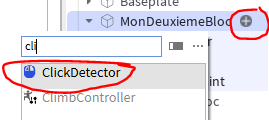
local clickDetector = script.Parent.ClickDetector
clickDetector.MouseClick:Connect(function()
print(« touché »)
end)
Comment coder un Prompt :
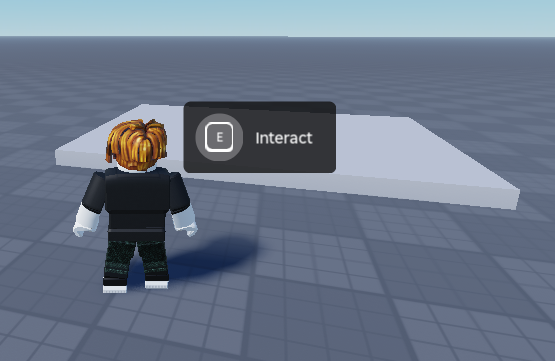
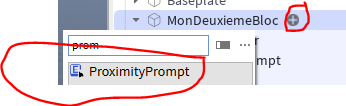
maPart.ProximityPrompt.Triggered:Connect(function(otherPart)
print(‘activé’)
end)
Créé un système de message RemoteEvent
Sous ReplicatedStorage crée un RemoteEvent
Dans un localScript :
local remoteEvent = ReplicatedStorage:WaitForChild("RemoteEvent")

remoteEvent:FireServer(param1, param2, ...)
Puis dans un script serveur :
local remoteEvent = ReplicatedStorage:WaitForChild("RemoteEvent")

remoteEvent .OnServerEvent:Connect(function(player, param1, param2, ...)

end)
Ajouter dans l’inventaire :
item.Parent = player.BackpackCréer un tableau de score :
Insérer un script leaderstats sous ServerScriptService :
local players = game:GetService("Players")

players.PlayerAdded:Connect(function(player)

	local leaderstats = Instance.new("Folder")
	leaderstats.Name = "leaderstats"
	leaderstats.Parent = player
	-- Exemple de valeurs du tableau
	local coins = Instance.new("IntValue")
	coins.Name = "Coins"
	coins.Parent = leaderstats
	coins.Value = 0
end)
Puis pour modifier le score dans un script serveur :
local player =
               game:GetService("Players"):
               GetPlayerFromCharacter(otherPart.Parent)
if not player then return end

player:WaitForChild("leaderstats").Coins.Value += 1
Comment intercepter une erreur par exemple sur « jouer un son » :
	local success, err = pcall(function()
		sound:Play()
	end)
	if not success then
		warn("Erreur lors de la lecture du son :", err)
	end
Rotation d’un objet :
local mypart = script.Parent

mypart.Touched:Connect(function(hit)
	mypart:PivotTo(mypart:GetPivot() *
                       CFrame.Angles(math.rad(90), 0, 0))
end)
Intercepter une touche de clavier :
Dans un LocalScript sous StarterPlayer StarterPlayerScripts
local UserInputService = game:GetService("UserInputService")

print("clavier bbb")
-- Connecte l'événement
UserInputService.InputBegan:Connect(function(input, gameProcessed)
	if input.KeyCode ~= Enum.KeyCode.Unknown then
		print("Clavier", input.KeyCode)

		if input.KeyCode == Enum.KeyCode.X and not gameProcessed then
			print("Appui X")
		end

	end

end)