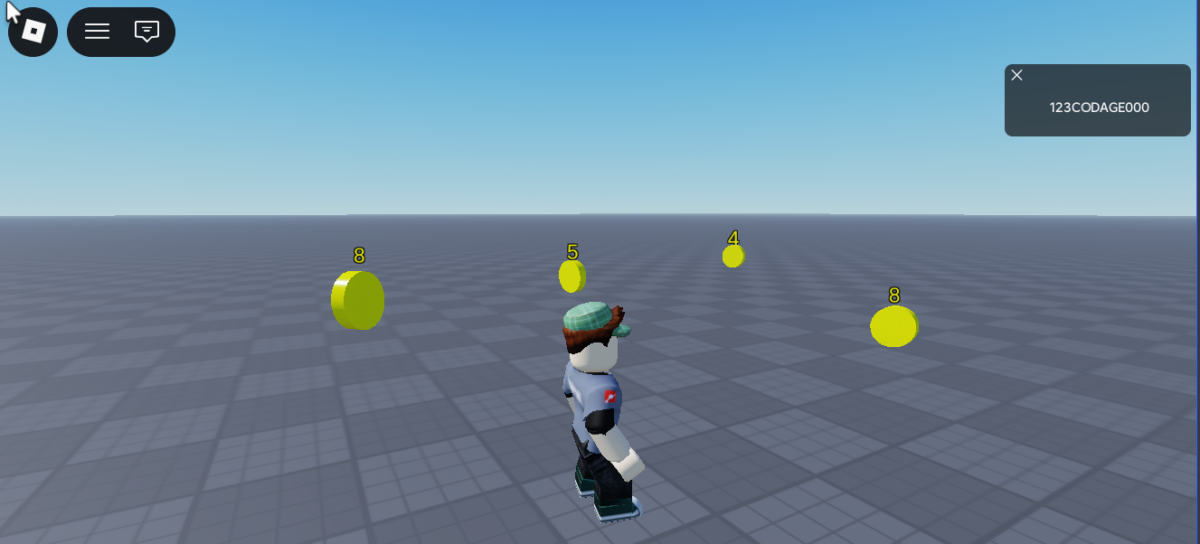
Crée un système de gain pour que ton joueur puisse gagner des points. Ce tuto montre comment programmer un système de gain en attrapant des pièces de valeurs différentes. Tu pourras répliquer autant de pièces que tu le souhaites dans ton monde.
Tu peux convertir cette proposition par un système de gains autre que par des pièces. A toi d’être imaginatif !!!

Crée la structure suivante « Coins » pour ton système de gain :

Crée un Model sous workspace que tu peux renommer Coins. Puis dessous ajoute un son, puis un script et également un part pour représenter ta pièce.
Puis modifie ton script pour générer ton système de gain, le script affiche la pièce et le gain potentiel. Pour l’instant le joueur ne peut pas récupérer les pièces donc son gain :
local RunService = game:GetService("RunService")
local Players    = game:GetService("Players")

-- Configuration
local ROTATION_SPEED   = 5
local MAX_GAIN         = 10
local RESPAWN_DELAY    = 10   -- secondes avant respawn
local FADE_SPEED       = 0.05 -- vitesse de disparition
local COIN_LEADERBOARD = "Coins" --leaderstats

-- Répertoire de ton système de gains sous workspace
local coinsFolder = script.Parent
-- Chargement du fichier sonore (si présent)
local sound = coinsFolder:FindFirstChildOfClass("Sound")
if not sound then
	warn("[CoinManager] Aucun Sound trouvé dans ", coinsFolder.Name)
end

-- Initialise et retourne les composants d'une pièce
-- Ajoute à tes pièces la valeur du gain et un système de particules
local function setupCoin(coin)
	coin.Anchored = true
	coin.Transparency = 0
	coin.CanTouch   = true
	coin.CanCollide   = false

	-- Hitbox box de collision autour de la pièce
	local hitbox = Instance.new("Part")
	hitbox.Name         = "Hitbox"
	hitbox.Parent       = coin
	hitbox.Position     = coin.Position
	hitbox.Size         = Vector3.new(coin.Size.X, coin.Size.Y, coin.Size.Z)
	hitbox.Transparency = 0.5
	hitbox.CanCollide   = false
	hitbox.Anchored     = true

	-- Particule effet lorsque le pièce est touchée
	local particule = Instance.new("ParticleEmitter")
	particule.Parent           = coin
	particule.EmissionDirection = Enum.NormalId.Back
	particule.Enabled          = false
	particule.Speed            = NumberRange.new(20, 60)
	particule.Rate			   = 40
	particule.ShapeInOut	   = Enum.ParticleEmitterShapeInOut.InAndOut

	-- Billboard pour afficher le gain
	local billboard = Instance.new("BillboardGui")
	billboard.Name        = "CoinLabel"
	billboard.Adornee     = coin
	billboard.Size        = UDim2.new(0, 40, 0, 20)
	billboard.StudsOffset = Vector3.new(0, coin.Size.Y/2 + 1, 0)
	billboard.AlwaysOnTop = false
	billboard.Parent      = coin

	local label = Instance.new("TextLabel")
	label.Parent               = billboard
	label.Size                 = UDim2.new(1, 0, 1, 0)
	label.BackgroundTransparency = 1
	label.Text                 = tostring(math.random(1, MAX_GAIN))
	label.TextColor3           = Color3.fromRGB(255, 255, 0)
	label.TextStrokeTransparency = 0
	label.TextScaled           = true

	return hitbox, particule, label, billboard
end


-- Connecte la logique de collecte sur une pièce
local function connectCoin(coin)

	local hitbox, particule, label, billboard = setupCoin(coin)
	local gain = tonumber(label.Text)

end

-- Rotation & disparition progressive (Heartbeat)
RunService.Heartbeat:Connect(function()
	for _, coin in coinsFolder:GetChildren() do
		if not coin:IsA("Part") then continue end

		if coin.CanTouch then
			-- Rotation active
			if coin.Transparency > 0 then
				coin.Transparency = 0
			end
			coin.CFrame *= CFrame.Angles(0, math.rad(ROTATION_SPEED), 0)
		else
			-- Disparition progressive
			coin.Transparency = math.min(coin.Transparency + FADE_SPEED, 1)
		end
	end
end)

-- Initialisation de toutes les pièces
for _, coin in coinsFolder:GetChildren() do
	if coin:IsA("Part") then
		connectCoin(coin)
	end
end
Puis modifie ton script pour que le joueur puisse attraper les pièces :
local RunService = game:GetService("RunService")
local Players    = game:GetService("Players")

-- Configuration
local ROTATION_SPEED   = 5
local MAX_GAIN         = 10
local RESPAWN_DELAY    = 10   -- secondes avant respawn
local FADE_SPEED       = 0.05 -- vitesse de disparition
local COIN_LEADERBOARD = "Coins" --leaderstats

-- Répertoire de ton système de gains sous workspace
local coinsFolder = script.Parent
-- Chargement du fichier sonore (si présent)
local sound = coinsFolder:FindFirstChildOfClass("Sound")
if not sound then
	warn("[CoinManager] Aucun Sound trouvé dans ", coinsFolder.Name)
end

-- Initialise et retourne les composants d'une pièce
-- Ajoute à tes pièces la valeur du gain et un système de particules
local function setupCoin(coin)
	coin.Anchored = true
	coin.Transparency = 0
	coin.CanTouch   = true
	coin.CanCollide   = false

	-- Hitbox box de collision autour de la pièce
	local hitbox = Instance.new("Part")
	hitbox.Name         = "Hitbox"
	hitbox.Parent       = coin
	hitbox.Position     = coin.Position
	hitbox.Size         = Vector3.new(coin.Size.X, coin.Size.Y, coin.Size.Z)
	hitbox.Transparency = 0.5
	hitbox.CanCollide   = false
	hitbox.Anchored     = true

	-- Particule effet lorsque le pièce est touchée
	local particule = Instance.new("ParticleEmitter")
	particule.Parent           = coin
	particule.EmissionDirection = Enum.NormalId.Back
	particule.Enabled          = false
	particule.Speed            = NumberRange.new(20, 60)
	particule.Rate			   = 40
	particule.ShapeInOut	   = Enum.ParticleEmitterShapeInOut.InAndOut

	-- Billboard pour afficher le gain
	local billboard = Instance.new("BillboardGui")
	billboard.Name        = "CoinLabel"
	billboard.Adornee     = coin
	billboard.Size        = UDim2.new(0, 40, 0, 20)
	billboard.StudsOffset = Vector3.new(0, coin.Size.Y/2 + 1, 0)
	billboard.AlwaysOnTop = false
	billboard.Parent      = coin

	local label = Instance.new("TextLabel")
	label.Parent               = billboard
	label.Size                 = UDim2.new(1, 0, 1, 0)
	label.BackgroundTransparency = 1
	label.Text                 = tostring(math.random(1, MAX_GAIN))
	label.TextColor3           = Color3.fromRGB(255, 255, 0)
	label.TextStrokeTransparency = 0
	label.TextScaled           = true

	return hitbox, particule, label, billboard
end

-- Réinitialise une pièce pour le respawn
local function resetCoin(coin)
	coin.Transparency = 0
	coin.CanTouch   = true
end

-- Connecte la logique de collecte sur une pièce
local function connectCoin(coin)

	local hitbox, particule, label, billboard = setupCoin(coin)
	local gain = tonumber(label.Text)

	hitbox.Touched:Connect(function(otherPart)
		if not coin.CanTouch then return end

		local character = otherPart.Parent
		if not character then return end

		local player   = Players:GetPlayerFromCharacter(character)
		local humanoid = character:FindFirstChildOfClass("Humanoid")
		if not player or not humanoid then return end

		-- Collecte
		coin.CanTouch   = false
		particule.Enabled = true
		billboard.Enabled = false

		-- Lecture protégée
		local soundDuration = 1 -- fallback si pas de son
		if sound then
			pcall(function() sound:Play() end)
			soundDuration = sound.TimeLength > 0 and sound.TimeLength or 1
		end

		-- Ajout des points
		local leaderstats = player:FindFirstChild("leaderstats")
		if leaderstats and leaderstats:FindFirstChild(COIN_LEADERBOARD) then
			leaderstats.Coins.Value += gain
		end

		-- Arrêt des particules à la fin du son
		task.delay(soundDuration, function()
			if not coin or not coin.Parent then return end
			particule.Enabled = false
			particule:Clear()
		end)

		-- Relance de la pièce après un délai
		if RESPAWN_DELAY > 0 then
			task.delay(RESPAWN_DELAY, function()
				-- Attente puis respawn
				if not coin or not coin.Parent then return end
				resetCoin(coin)
			end)

		end
	end)
end

-- Rotation & disparition progressive (Heartbeat)
RunService.Heartbeat:Connect(function()
	for _, coin in coinsFolder:GetChildren() do
		if not coin:IsA("Part") then continue end

		if coin.CanTouch then
			-- Rotation active
			if coin.Transparency > 0 then
				coin.Transparency = 0
			end
			coin.CFrame *= CFrame.Angles(0, math.rad(ROTATION_SPEED), 0)
		else
			-- Disparition progressive
			coin.Transparency = math.min(coin.Transparency + FADE_SPEED, 1)
		end
	end
end)

-- Initialisation de toutes les pièces
for _, coin in coinsFolder:GetChildren() do
	if coin:IsA("Part") then
		connectCoin(coin)
	end
end
Tu peux changer ces paramètres :
local ROTATION_SPEED = 5 — Modifie la vitesse de rotation de tes pièces
local MAX_GAIN = 10 — Modifie le système de gain de 1 à 10
local RESPAWN_DELAY = 5 — Secondes avant respawn des pièces, 0 pas de respawn des pièces
local FADE_SPEED = 0.01 — vitesse de la disparition des pièces
Duplique les pièces et place les dans ton espace de jeu :