Créer ta propre barre de vie
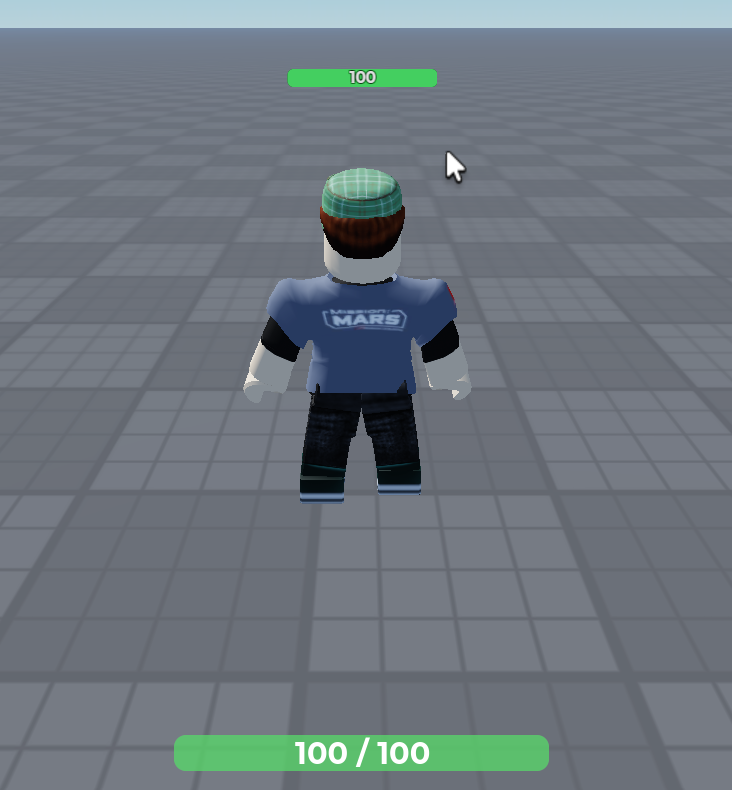
LocalScript à placer dans StarterPlayerScripts. Le script construit l’interface lui-même.
-- ==================== SERVICES ====================
local Players = game:GetService("Players")
local StarterGui = game:GetService("StarterGui")
local TweenService = game:GetService("TweenService")

-- ==================== CONFIGURATION ====================
local BAR_SIZE = UDim2.fromOffset(250, 24)
local BAR_POSITION = UDim2.new(0.5, 0, 0.95, 0)
local COLOR_FULL = Color3.fromRGB(80, 220, 100)
local COLOR_LOW = Color3.fromRGB(230, 60, 60)
local TWEEN_INFO = TweenInfo.new(0.25, Enum.EasingStyle.Quad)

-- ==================== RÉFÉRENCES ====================
local player = Players.LocalPlayer
local playerGui = player:WaitForChild("PlayerGui")

-- Cache la barre de vie par défaut (avec nouvelles tentatives si le CoreGui n'est pas prêt)
for _ = 1, 5 do
	local ok = pcall(function()
		StarterGui:SetCoreGuiEnabled(Enum.CoreGuiType.Health, false)
	end)
	if ok then break end
	task.wait(0.5)
end

-- ==================== INTERFACE ====================
local screenGui = Instance.new("ScreenGui")
screenGui.Name = "HealthGui"
screenGui.ResetOnSpawn = false
screenGui.Parent = playerGui

local background = Instance.new("Frame")
background.AnchorPoint = Vector2.new(0.5, 0.5)
background.Position = BAR_POSITION
background.Size = BAR_SIZE
background.BackgroundColor3 = Color3.fromRGB(170, 170, 170)
background.BorderSizePixel = 0
background.BackgroundTransparency = 0.8
background.Parent = screenGui


local corner = Instance.new("UICorner")
corner.CornerRadius = UDim.new(0, 8)
corner.Parent = background

local fill = Instance.new("Frame")
fill.Size = UDim2.fromScale(1, 1)
fill.BackgroundColor3 = COLOR_FULL
fill.BorderSizePixel = 0
fill.BackgroundTransparency = 0.3
fill.Parent = background

local corner = Instance.new("UICorner")
corner.CornerRadius = UDim.new(0, 8)
corner.Parent = fill

local healthText = Instance.new("TextLabel")
healthText.Size = UDim2.fromScale(1, 1)
healthText.BackgroundTransparency = 1
healthText.TextColor3 = Color3.new(1, 1, 1)
healthText.TextScaled = true
healthText.Font = Enum.Font.GothamBold
healthText.ZIndex = 2
healthText.Parent = background

-- ==================== MISE À JOUR ====================
local function updateBar(humanoid)
	local ratio = math.clamp(humanoid.Health / humanoid.MaxHealth, 0, 1)

	TweenService:Create(fill, TWEEN_INFO, {
		Size = UDim2.fromScale(ratio, 1),
		BackgroundColor3 = COLOR_LOW:Lerp(COLOR_FULL, ratio), -- rouge quand la vie baisse
	}):Play()

	healthText.Text = math.ceil(humanoid.Health) .. " / " .. math.ceil(humanoid.MaxHealth)
end

-- Se reconnecte au nouvel Humanoid à chaque respawn
local function onCharacterAdded(character)
	local humanoid = character:WaitForChild("Humanoid")

	updateBar(humanoid)
	humanoid.HealthChanged:Connect(function()
		updateBar(humanoid)
	end)
	humanoid:GetPropertyChangedSignal("MaxHealth"):Connect(function()
		updateBar(humanoid)
	end)
end

player.CharacterAdded:Connect(onCharacterAdded)
if player.Character then
	onCharacterAdded(player.Character)
end
Fonctionnement
HealthChangedse déclenche à chaque variation de vie, donc la barre reste synchronisée sans boucle.- Le ratio
Health / MaxHealthdonne la largeur de la barre (de 0 à 1). Lerpfait passer la couleur du vert au rouge selon la vie restante.- Reconnexion au respawn : chaque respawn crée un nouvel
Humanoid, il faut donc se reconnecter à lui. - La vie est gérée par le serveur : le client ne fait qu’afficher. Les modifications de
Healthdoivent se faire dans unScriptserveur pour être valides et visibles par tous.
Un bandeau de vie au dessus du joueur visible de tous :
Script serveur à placer dans ServerScriptService. Comme l’interface est créée côté serveur, elle est répliquée automatiquement à tous les joueurs, et chacun voit la barre des autres.
-- ==================== SERVICES ====================
local Players = game:GetService("Players")

-- ==================== CONFIGURATION ====================
local BAR_SIZE = UDim2.fromOffset(100, 12)        -- Taille de la barre (pixels)
local BAR_OFFSET = Vector3.new(0, 2.5, 0)         -- Hauteur au-dessus de la tête (studs)
local MAX_VISIBLE_DISTANCE = 60                   -- Distance max d'affichage (studs)
local COLOR_FULL = Color3.fromRGB(80, 220, 100)   -- Couleur quand la vie est pleine
local COLOR_LOW = Color3.fromRGB(230, 60, 60)     -- Couleur quand la vie est basse
local BACKGROUND_COLOR = Color3.fromRGB(30, 30, 30)
local HIDE_DEFAULT_OVERLAY = true                 -- Cache le nom/la barre par défaut de Roblox

-- ==================== CRÉATION DE LA BARRE ====================

-- Construit le BillboardGui et retourne la barre de remplissage et le texte
local function createHealthBar(head)
	local billboard = Instance.new("BillboardGui")
	billboard.Name = "HealthBar"
	billboard.Adornee = head
	billboard.Size = BAR_SIZE
	billboard.StudsOffset = BAR_OFFSET
	billboard.MaxDistance = MAX_VISIBLE_DISTANCE
	billboard.AlwaysOnTop = false -- la barre est cachée derrière les murs
	billboard.Parent = head

	local background = Instance.new("Frame")
	background.Size = UDim2.fromScale(1, 1)
	background.BackgroundColor3 = BACKGROUND_COLOR
	background.BorderSizePixel = 0
	background.Parent = billboard

	local backgroundCorner = Instance.new("UICorner")
	backgroundCorner.CornerRadius = UDim.new(0, 4)
	backgroundCorner.Parent = background

	local fill = Instance.new("Frame")
	fill.Name = "Fill"
	fill.Size = UDim2.fromScale(1, 1)
	fill.BackgroundColor3 = COLOR_FULL
	fill.BorderSizePixel = 0
	fill.Parent = background

	local fillCorner = Instance.new("UICorner")
	fillCorner.CornerRadius = UDim.new(0, 4)
	fillCorner.Parent = fill

	local healthText = Instance.new("TextLabel")
	healthText.Name = "HealthText"
	healthText.Size = UDim2.fromScale(1, 1)
	healthText.BackgroundTransparency = 1
	healthText.TextColor3 = Color3.new(1, 1, 1)
	healthText.TextStrokeTransparency = 0.5
	healthText.TextScaled = true
	healthText.Font = Enum.Font.GothamBold
	healthText.ZIndex = 2
	healthText.Parent = background

	return fill, healthText
end

-- ==================== MISE À JOUR ====================

-- Met à jour la largeur, la couleur et le texte selon la vie actuelle
local function updateHealthBar(humanoid, fill, healthText)
	local ratio = math.clamp(humanoid.Health / humanoid.MaxHealth, 0, 1)

	fill.Size = UDim2.fromScale(ratio, 1)
	fill.BackgroundColor3 = COLOR_LOW:Lerp(COLOR_FULL, ratio) -- rouge quand la vie baisse
	healthText.Text = math.ceil(humanoid.Health)
end

-- ==================== GESTION DES PERSONNAGES ====================

local function onCharacterAdded(character)
	local humanoid = character:WaitForChild("Humanoid")
	local head = character:WaitForChild("Head")

	-- Cache l'affichage par défaut pour éviter le doublon avec notre barre
	if HIDE_DEFAULT_OVERLAY then
		humanoid.DisplayDistanceType = Enum.HumanoidDisplayDistanceType.None
	end

	local fill, healthText = createHealthBar(head)
	updateHealthBar(humanoid, fill, healthText)

	-- Les connexions sont liées à cet Humanoid : elles disparaissent avec lui au respawn
	humanoid.HealthChanged:Connect(function()
		updateHealthBar(humanoid, fill, healthText)
	end)
	humanoid:GetPropertyChangedSignal("MaxHealth"):Connect(function()
		updateHealthBar(humanoid, fill, healthText)
	end)
end

local function onPlayerAdded(player)
	player.CharacterAdded:Connect(onCharacterAdded)

	-- Si le personnage existe déjà (script lancé en cours de partie)
	if player.Character then
		task.spawn(onCharacterAdded, player.Character)
	end
end

for _, player in ipairs(Players:GetPlayers()) do
	onPlayerAdded(player)
end

Players.PlayerAdded:Connect(onPlayerAdded)
Fonctionnement
- Parent =
Head: leBillboardGuiest attaché à la tête, donc il suit le personnage et est détruit avec lui au respawn. Pas de nettoyage manuel. HealthChangedmet la barre à jour à chaque variation de vie, sans boucle.- Réplication automatique : le serveur modifie la taille de
Fill, et tous les clients voient le changement. MaxDistanceévite d’afficher des barres de joueurs très éloignés, ce qui allège aussi le rendu.DisplayDistanceType = Noneretire le nom et la barre par défaut de Roblox. MetsHIDE_DEFAULT_OVERLAY = falsesi tu veux garder le nom au-dessus de la tête.