Dans ce tutoriel, tu vas apprendre à créer une arme que le joueur pourra récupérer dans le monde du jeu puis utiliser pour combattre des ennemis.
L’objectif est de réaliser un système complet comprenant :
- une arme posée au sol ;
- le ramassage automatique par le joueur ;
- l’utilisation de l’arme depuis l’inventaire ;
- une animation de frappe ;
- des effets visuels lors de l’attaque ;
- la détection des ennemis touchés ;
- l’application de dégâts.
À la fin du projet, ton personnage pourra se défendre contre des adversaires comme dans de nombreux jeux d’aventure ou de rôle.
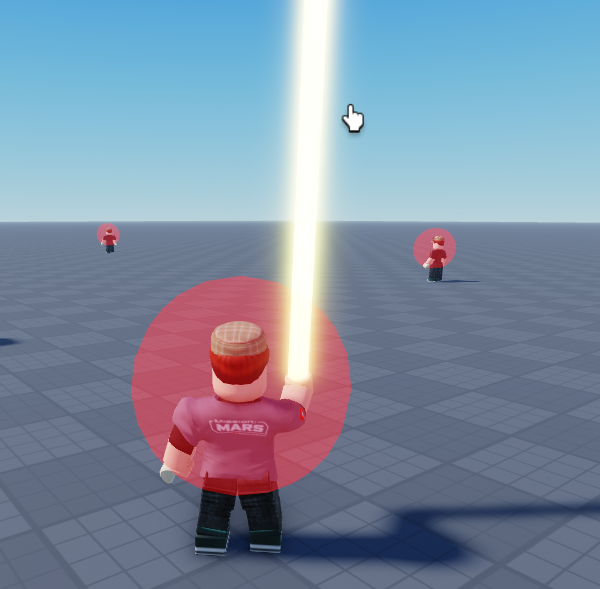
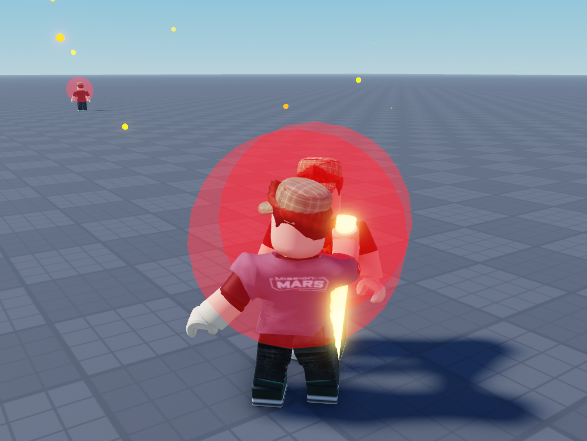
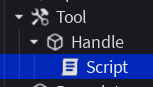
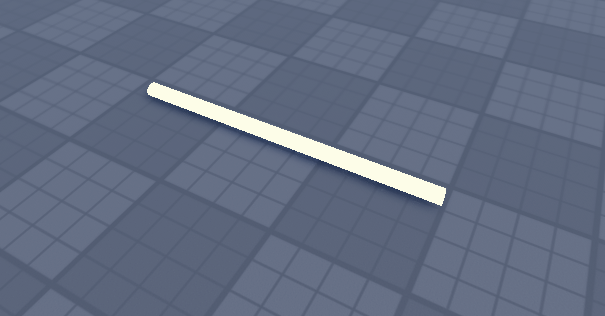
Crée une arme avec l’objet Tool puis un part renommer « Handle » de roblox :
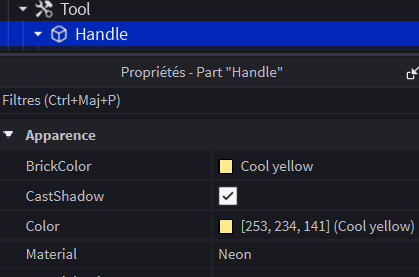
Choisis la matière et la couleur de ton arme :
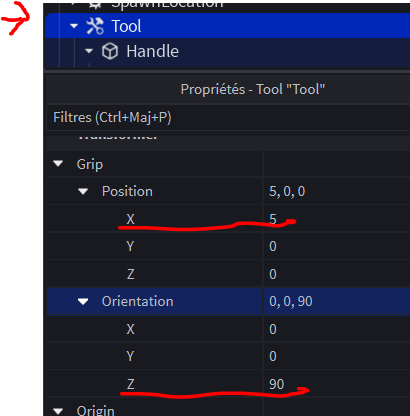
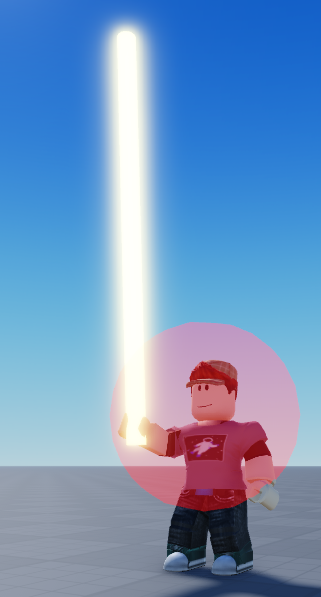
Positionne l’arme dans la main du joueur :
Saisie ce code dans le script :
-- récupération de l'arme
local arm = script.Parent

-- récupération des services pour animer
local Debris = game:GetService("Debris")
local TweenService = game:GetService("TweenService")
local Debris = game:GetService("Debris")

--
-- CONFIGURATION DES ANIMATIONS
--
local CONFIG = {
	-- Particules
	nbEtincelles    = 50,
	-- Onde de choc
	ondeActive      = true,
	ondeCouleur     = Color3.fromRGB(255, 150, 0),
	-- Dégâts (rayon)
	rayonDegats     = 40,
	-- Flash
	flashActif      = true,
	sizeFlash       = Vector3.new(5, 5, 5),
	colorFlash      = Color3.fromRGB(255, 0, 0),

}

--
-- EFFET FLASH ET ONDE DE CHOC
--

local function creerFlash(position)
	local flash = Instance.new("Part")
	flash.Shape = Enum.PartType.Ball
	flash.Size = Vector3.new(0.1, 0.1, 0.1)
	flash.Position = position
	flash.Anchored = true
	flash.CanCollide = false
	flash.CastShadow = false
	flash.Material = Enum.Material.Neon
	flash.Color = CONFIG.colorFlash
	flash.Parent = workspace

	local tween = TweenService:Create(flash,
		TweenInfo.new(0.15, Enum.EasingStyle.Quad, Enum.EasingDirection.Out),
		{ Size = CONFIG.sizeFlash, Transparency = 1 }
	)
	tween:Play()
	Debris:AddItem(flash, 0.2)
end

local function creerOndeChoc(position)
	local onde = Instance.new("Part")
	onde.Shape = Enum.PartType.Ball
	onde.Size = Vector3.new(1, 1, 1)
	onde.Position = position
	onde.Anchored = true
	onde.CanCollide = false
	onde.CastShadow = false
	onde.Material = Enum.Material.Neon
	onde.Color = CONFIG.ondeCouleur
	onde.Transparency = 0.8
	onde.Parent = workspace

	local tween = TweenService:Create(onde,
		TweenInfo.new(0.4, Enum.EasingStyle.Quad, Enum.EasingDirection.Out),
		{ Size = Vector3.new(CONFIG.rayonDegats * 2, CONFIG.rayonDegats * 2, CONFIG.rayonDegats * 2), Transparency = 1 }
	)
	tween:Play()
	Debris:AddItem(onde, 0.5)
end
--
-- EFFET ETINCELLES
--
local function creerEtincelles(position)
	for i = 1, CONFIG.nbEtincelles do
		local etincelle = Instance.new("Part")
		etincelle.Shape = Enum.PartType.Ball
		-- taille des etincelles
		etincelle.Size = Vector3.new(0.2, 0.2, 0.2)
		etincelle.Position = position
		etincelle.CanCollide = false
		etincelle.CastShadow = false
		etincelle.Material = Enum.Material.Neon
		-- Couleur aléatoire entre orange et jaune
		etincelle.Color = Color3.fromRGB(255, math.random(100, 255), 0)
		etincelle.Parent = workspace

		-- Direction aléatoire
		local direction = Vector3.new(
			math.random(-100, 100) / 100,
			math.random(20, 100) / 100,
			math.random(-100, 100) / 100
		).Unit
		-- vitesse aléatoire de propagation des étincelles
		local vitesse = math.random(20, 200)
		local vb = Instance.new("BodyVelocity")
		vb.Velocity = direction * vitesse
		vb.MaxForce = Vector3.new(1e4, 1e4, 1e4)
		vb.Parent = etincelle

		-- Disparition progressive
		local duree = math.random(5, 12) / 10
		local tween = TweenService:Create(etincelle,
			TweenInfo.new(duree, Enum.EasingStyle.Quad, Enum.EasingDirection.In),
			{ Transparency = 1, Size = Vector3.new(0.05, 0.05, 0.05) }
		)
		tween:Play()
		Debris:AddItem(etincelle, duree)
	end
end
--
-- limite le nombre de dégâts pendant un certain temps
--
local function withCooldown(hit)
	local tag = Instance.new("Folder")
	tag.Name = "ArmTag"
	tag.Parent = hit.Parent
	Debris:AddItem(tag, 0.4)
	task.wait(0.4)
end
-- si le joueur est en cooldown, ne pas appliquer les dégâts
local function isCooldown(hit)
	return hit.Parent:FindFirstChild("ArmTag")
end
-- mouvement coup d'épée
local function swordStroke(arm)
	local tween = TweenService:Create(arm.Parent,
		TweenInfo.new(1, Enum.EasingStyle.Elastic, Enum.EasingDirection.Out),
		{ Grip = arm.Parent.Grip * CFrame.Angles(0, 0, math.rad(90)) }
	)
	tween:Play()
end
-- l'arme touche un humanoid
arm.Touched:Connect(function(hit)
	local humanoid = hit and hit.Parent:FindFirstChild("Humanoid")
	local player = game.Players:GetPlayerFromCharacter(hit.Parent)
	if player then return end
	if not humanoid then return end
	if isCooldown(hit) then return end
	-- coup d'épée
	swordStroke(arm)
	-- dégâts
	humanoid:TakeDamage(10)
	-- effets
	if CONFIG.flashActif   then creerFlash(hit.Position)      end
	if CONFIG.ondeActive   then creerOndeChoc(hit.Position)   end
	creerEtincelles(hit.Position)
	-- cooldown pendant un certain temps
	withCooldown(hit)
end)
Rajoute un son laser
Insère un son dans l’arborescence du tool :
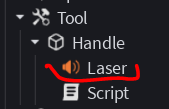
Rajoute dans ton script la référence du son :
local soundLaser = arm.LaserPuis ajoute dans ton script la fonction pour jouer le son :
local function playSound(sound)
	if not sound then return end
	pcall(function() sound:Play() end)
end
Puis modifie la fonction arm.Touched pour jouer le son :
-- l'arme touche un humanoid
arm.Touched:Connect(function(hit)
	local humanoid = hit and hit.Parent:FindFirstChild("Humanoid")
	local player = game.Players:GetPlayerFromCharacter(hit.Parent)
	if player then return end
	if not humanoid then return end
	if isCooldown(hit) then return end
	-- coup d'épée
	playSound(soundLaser)
	swordStroke(arm)
	-- dégâts
	humanoid:TakeDamage(10)
	-- effets
	if CONFIG.flashActif   then creerFlash(hit.Position)      end
	if CONFIG.ondeActive   then creerOndeChoc(hit.Position)   end
	creerEtincelles(hit.Position)
	-- cooldown pendant un certain temps
	withCooldown(hit)
end)